

Lenovo
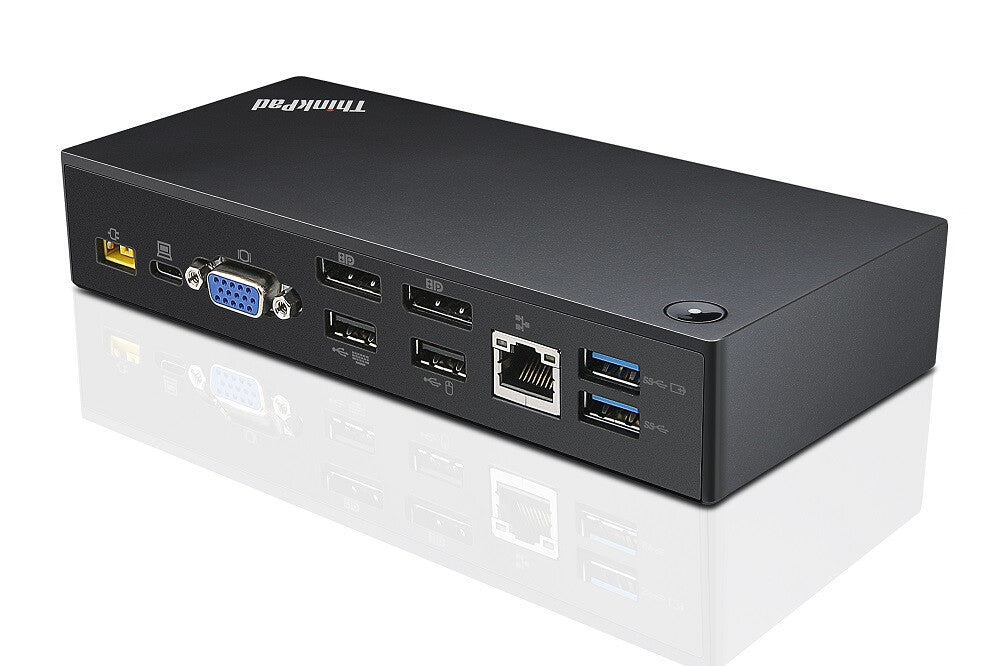
Lenovo 40A90090IT laptop dock/port replicator Wired USB 3.2 Gen 1 (3.1 Gen 1) Type-C Black
Lenovo 40A90090IT laptop dock/port replicator Wired USB 3.2 Gen 1 (3.1 Gen 1) Type-C Black
SKU:40A90090IT
Low stock: 5 left
Couldn't load pickup availability
Delivery & lead times
Delivery & lead times
Some products ship directly from our suppliers and can have longer lead times than stock held in the UK. If you need a delivery date, please contact us before ordering. See our shipping policy.
Buying 5 or more? Volume pricing
Buying 5 or more? Volume pricing
We offer volume pricing, business accounts and quotations for organisations. Request a quote or call 01344 963637.
Returns & warranty
Returns & warranty
See our refund policy. Manufacturer warranty terms vary by product - contact us if you need warranty details before you buy.
- Wired
- Host interface: USB 3.2 Gen 1 (3.1 Gen 1) Type-C
- Ethernet LAN Wake-on-LAN ready
- Cable lock slot
The ThinkPad USB-C Dock is a new universal docking solution ensuring a productive workstation. Experience all your productivity needs including video, data, and wired network all while delivering continuous power to your laptop via a robust USB Type-C port. Simply connect your laptop or tablet with the dock and boost your productivity in no time. Single UHD display30Hz or dual FHD displays allow you to enjoy a vivid video experience.Always Connected via USB Type-C
A Power Hub for Your Desk
Experience up to 60W of stable, reliable, and continuous power for your laptop or tablet ensuring your station is always ready for peak productivity. Apart from charging your notebook or tablet and mobile device charging with 15W and 10.5W from the USB-C port and USB 3.0 always power on port respectively.
An Unprecedented View
Enjoy a vivid video experience with an Ultra High Definition (UHD – 4K) display or take multi-tasking to a new level two FHD (1080p) displays.
An Enterprise Flagship
Supports network manageability for your ThinkPad system such as PXE boot, system Wake-On LAN from Sleep mode, Hibernate mode, or Power-off mode, and Pass through ThinkPad notebook MAC address to the dock.
Complete Control of Your Device
Once your ThinkPad device is connected to the dock, the power button on the dock mirrors the system power button – simply press it to power your system ON or OFF.
| Performance | |
|---|---|
| Product colour | Black |
| Card reader integrated | No |
| Number of displays supported | 2 |
| Cable lock slot | Yes |
| Cable lock slot type | Kensington |
| Certification | CB,CULUS,EAC,TUV Mark,FCC,ICES, DOC, NOM,KCC, RCM, BSMI, VCCI, CE, LoA |
| Operational conditions | |
|---|---|
| Operating temperature (T-T) | -5 - 40 °C |
| Operating relative humidity (H-H) | 20 - 95% |
| Weight & dimensions | |
|---|---|
| Width | 171 mm |
| Depth | 80 mm |
| Height | 32.5 mm |
| Packaging content | |
|---|---|
| Cables included | AC, USB Type-C |
| AC adapter included | Yes |